Monday, July 15, 2013

Minor Updates to Surreal Landscape Demo

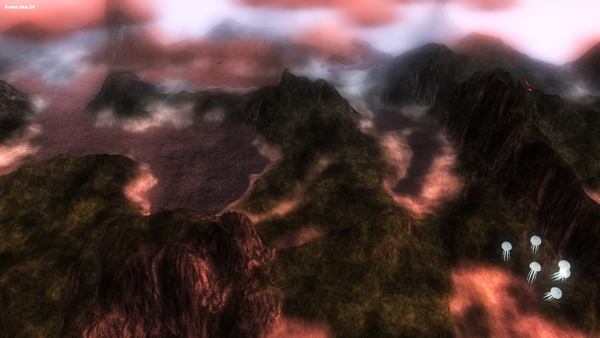
This weekend I did a but of work on my surreal landscape demo. I re-modelled the jellyfish (more detailed and better looking) and re-worked their animation (I'm just doing it in the vertex shader via sine and cosine waves at the moment).

I added some basic trees to get a feel of what it will look like once I start adding more foliage. I also added a bit more vegetation (cycads). I'm using instancing for almost everything at the moment, and so I'm using texture atlases (multiple textures combined into one image, with each instance able to use any of them). When setting up each instance, I randomly choose a texture offset which controls which image in the texture atlas is used. Each instance also has a random rotation, scale and colour modifier, resulting in greater variety whilst still keeping the number of draw calls to a minimum.


I also re-worked the way I handle bloom. Prior to this I had a very simple method in place, which I had hobbled together just as a placeholder until I had some time to do it properly. I was doing a Gaussian filter both vertically and horizontally in one pass as opposed to filtering first horizontally, and then vertically in a separate pass. I am doing it correctly now (separate horizontal and vertical passes) so as to reduce the number of filter samples required. Additionally, I wasn't performing the bright pass before passing them into the filter -- instead I was performing it at a later stage, in the final post-processing shader stage. This resulted in halos around dark objects, because the bloom buffer contained blurred parts of both bright and dark parts of the image resulting in darker parts 'bleeding' over into brighter parts of the image. This is now fixed (note that the screenshots accompanying this post were taken before the current fix, so there may still be minor colour bleeding present in these images).


I also decided to alter various post-processing parameters based on the time of day. I found that I could tweak the post-processing parameters to make the scene look good for certain lighting conditions, but that the lighting conditions differed significantly enough that no single collection of settings looked perfect in all conditions. I now have various sets of variables for use in different lighting conditions. These include parameters that control the bloom bright pass (bloom exponent and bloom multiplier), as well as parameters that control the very last phase of the post-processing pipeline -- contrast and saturation.

I find that after applying bloom some of the colours are over-saturated. Although I am going for a fantasy dream-world feel, I don't want it to look too cartoony, so in order to get the visual results I want I increase the contrast and reduce the saturation of the final image so as to give it a slightly more gritty feel.

Thursday, July 11, 2013

More Surreal Landscape Screenshots

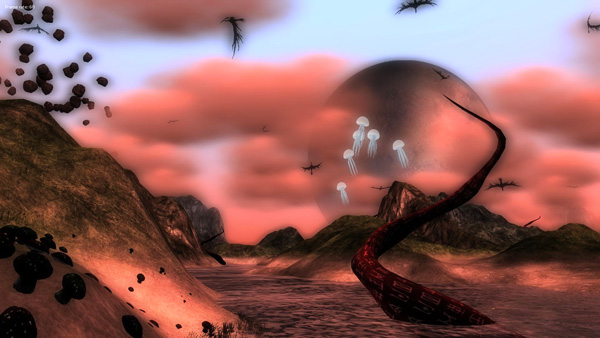
I did a bit more work on my surreal landscape demo. Last night I added jellyfish-like creatures that float in the air.

The intention is to eventually have a full ecosystem which gives a genuine sense of being alive. I want all creatures to interact with other creatures and with the environment. I've implemented a flocking algorithm so far and it looks pretty good. I also have red alien plants (visible in the screenshot below) that emerge and grow at night (and glow subtly), and mushrooms that emerge as the camera draws near. But ultimately I'd like to have some creatures hunting other creatures, far more complex group movement behaviours, creatures feeding off plants or attracted to lights, more plants growing as you watch, and so on.


The demo already feels very alive -- grass sways in the wind, the clouds are somewhat volumetric and move across the sky, planets in the sky move in an (admittedly physically-inaccurate but nice-looking) orbit and water ripples. This combined with the various creature types wandering the landscape and plants growing / emerging in real-time, gives a very vibrant, dynamic feel to the scene. Still, I want much more, even if I have to only feature some elements at a time (it might end up feeling a bit overwhelming). I've also been considering having it support the Oculus Rift when my dev-kit finally arrives.

The engine uses NVidia's Cg language for the shaders, a library called AssImp for supporting many mesh formats and a library called FW1FontWrapper for displaying text onscreen (a task that is surprisingly cumbersome in D3D11). Other than that, its just pure Direct3D 11 and standard Windows calls (oh, and also Direct Input 8). Eventually I'll bring across some of my sound code from other projects, which uses OpenAL and Ogg-Vorbis (which allows me to use the .ogg format, which has similar compression quality to mp3 but fewer useage restrictions).


I've fixed my engine clock (it had a flaw in it that caused delta time to vary based on frame rate). I brought across some code from Transcendence (an old D3D9-based game engine I developed in 2008) to replace the timing code with older, more thoroughly-tested code.

There are various different timing methods available, with the four most common being the functions clock(), timeGetTime(), GetTickCount() and the Microsoft-specific function QueryPerformanceCounter(). I support all four (I can alter which one I use at run-time), simply because I wanted to test for myself which one was most reliable. Strangely, although the general consensus is that QueryPerformanceCounter() is the most reliable (albeit with some work-arounds required on multi-core systems to prevent glitches), I have found clock() to be just as sound (even more reliable than QueryPerformanceCounter() on some systems), and timeGetTime() pretty close as well.


Tuesday, July 9, 2013

Surreal Landscape Demo Using D3D11.

Much of my technical work in the last few years has been focused on work projects. Although I've been doing some casual dev at home, a fair bit has been me experimenting with making simple casual games like Shroomsters and Death Arena.

I recently registered on the "Make Games SA" site and chatted to a few people on the forums and showed them Shroomsters. One comment really got me thinking, and that was that, given my background, it wasn't quite what they would have expected from me. Looking at some of my recent technical work, specifically at a D3D11 engine I developed last year (and a bit earlier this year), I realized that it had the potential to make a decent tech demo, if only I started focusing more on the end result and less on the architecture and technical / academic aspects of it.

The engine was previously called Paradox, though I've had to abandon the name now, as another engine (a D3D11-based C# engine) has emerged with the same name. Also, apparently a team in the demoscene in the 90's had the same name as well.

I haven't chosen a new name for the engine, though at this point I don't think its necessary, since it is turning into more of a demo (and potential game... maaaaaybe). The demo will be called Clarion (for reasons that I won't go into now, but there is a story to it).

Right now I'm only about 3 weeks in, but I've made some decent progress. Here are some screenshots of the current version. I'll release more soon.

Edit: the name Clarion is apparently also taken! I suppose all the good names are. Oh well, I'll think of something.


Friday, June 21, 2013

Voxel Systems on a Distributed Architecture

One of our current projects is a continuous miner -- a mining machine designed to cut coal and soft minerals. The operator will have be, to some extent, free to dig / cut where he pleases, which introduced the need for the development of new technology to meet this requirement. At a tech meeting a few months back we came to the conclusion that voxels would be a suitable fit for these requirements, and so for the past few months I have been working on developing a voxel framework and integrating it into our engine. For this particular project there will be three separate systems in the world, each representing a 'diggable' / destroyable part of the world.


We were a bit wary starting off, knowing that developing voxel technology isn't an undertaking to be taken lightly, especially given time constraints and some relatively unique aspects of our architecture.

One of the challenges I've faced is ensuring that the voxel systems work with our recording / playback system. A feature of our sims is the ability to store and play back exercises, which works by storing the state of the system at short intervals into a database. Voxels require a massive amount of data to store, and saving it all to disk many times a second simply wasn't feasible.

In addition to this, we have a distributed architecture, whereby the core sim logic is performed on a dynamics node, which then pumps out network packets to multiple graphics nodes. To clarify: we have one PC acting as a server, receiving the input from the driver and handling the main logic and physics. The state of the sim is handled on this main server and is propogated to various client PCs via network packets. Each of these client PCs is a graphics node, each rendering to its own screen (the operator will typically be surrounded by several screens showing the 3D world).

Again, the massive amount of data required for a voxel representation of part of the world is much larger than what most people realize. This data set needs to exist on each node. As the vehicle digs into the rock (i.e. as voxels are destroyed), the data set changes and these changes need to be propogated to the client machines so that the visual representation is updated as well.

My initial implementation was to go the typical sparse voxel octree route. However, the fact that I needed to maintain the same data set over several nodes made this option less attractive than a slightly simpler, flat representation. I chose to rather partition the entire system into a fixed number of 'clumps'. So, for example, one might create a voxel system that is 10m x 10m x 10m, and specify that you want each clump to be 1m x 1m x 1m large, and that you want each voxel to be 10cm x 10cm x 10cm. In this instance, you would have 1000 voxel clumps, and each of those clumps would consist of 1000 voxels.

Rather than transmitting the entire data set per network packet update (and similarly, rather than save the entire dataset to the database each time), I transmit only a single voxel clump. Currently, each voxel is represented as a single byte. So for each network update I would be sending across (and storing), in the example described above, 1000 bytes, which is not too bad.


I was considering bit-packing them so that each voxel was one bit instead (which would mean 8 times less memory required). However, unfortunately voxels do require more than a binary state, and so this isn't feasible. One would think that a binary state is sufficient (after all, each voxel represents either solid space or empty space). But its a bit more complicated than that, since I need to keep track of other information that allows me to generate renderable geometry representing only the shell (that is, the outer layer of voxels). So a voxel's state can be one of the following:

- empty space
- solid space adjacent to empty space
- solid space surrounded by solid space
- solid space at one of the outer edges of the system

One of the issues I have faced so far is due to the fact that, as you dig into the rock, the data needs to be sent over a network and you're only sending information for a single clump at a time. If you destroy many voxels very quickly it takes a while for all of that information to be propogated, and so you see the visual representation kind-of fizzling and eating away at itself more slowly than it should. In the actual sim this shouldn't be a problem for two reasons -- firstly, you can only dig through rock at a fairly slow rate. Secondly, your vision will be obscured by the massive machinery, dust etc.

Another problem is the vehicle physics. One of the main ways our physics engine handles collision detection and response is using collision lines. We perform intersection tests on various programmer-defined lines against the world geometry and the dynamics team has the vehicle's behaviour based on reacttions to those. I had to implement line collisions tests for the voxel system. Although there are many, many optimizations that can be (and have been) made, in the end there is always going to be some unavoidable brute force 'is this line intersecting this box' logic going on. So far though, we seem to be ok. We won't really know if the current optimizations are enough to yield suitable performance until we're a bit further in.

Monday, May 27, 2013

Engine Updates 1st Quarter 2013

It has now been a few months since we’ve had a team dedicated to R&D and focusing on our graphics engine and tools. The following is a description of what we've been working on.

Topics discussed in this post are: 
  •         Dynamic time of day, weather and visibility transitions
  •         Picture in picture
  •         Morph animation
  •         Atmospheric effects framework
  •         Precipitation cones
  •         Sun shafts
  •         Volumetric clouds
  •         Volumetric mist
  •         Instancing and procedural mesh functionality
  •         Tri-planar mapping for dynamic soil
  •         Decal system for tyre tracks
  •         Voxel systems
  •         Instanced grass
  •         Instanced rock

Dynamic time of day, weather and visibility transitions
Our dynamic environment system controls time of day, weather and visibility. Unlike our old environment system from a few years back, our current one is fully dynamic (any time of day, weather and visibility combination is possible, rather than discrete settings). However, due to time constraints when developing it, we never took the time to fully expose these features, and so it isn’t readily apparent when using the sims.

In late 2012, because our Patria clients had such high expectations, we wanted to impress them in any way we could, and enabling / showcasing this existing functionality was one way to do so. I changed the framework in such a way that it can be turned on / off in the dynamic environment file in the library. When dynamic transitions are enabled, changes in time of day, weather and visibility occur via a transition that takes place over about a second (the duration is configurable).

In its current useage it’s pretty much just eye candy, but it highlights that we're using a dynamic system and showcases our technology a bit. Future military projects might require full use of the dynamic environment, whereby full control over time of day, weather and visibility is needed (rather than us just providing a few pre-selected discrete settings).


Picture in picture
The sim now supports picture in picture functionality. We experienced some rendering artifacts when trying to ship with this functionality earlier this year, but have fixed this now (well… hopefully we have, we’ll verify soon, and remedy any issues that arise).


Morph animation
I started working on integrating a new animation technique, called morph animation, into our sims. Currently we use a very outdated method using multiple static meshes that we simply switch between. This method would allow us to blend between these static meshes instead (and thus require fewer discrete animation frames, we’d only require a few control frames and would procedurally create the rest). This would give smoother animation, save memory, and save time for the artists. However, this functionality is not yet finished, and so is not available yet. We are investigating using animation middleware, which would probably prove to be an even better route. As such, work on morph animation is on hold for now.


Atmospheric effects framework
This is a framework that integrated precipitation cones, sunshafts, volumetric clouds and volumetric fog into the sim. Each of these will be discussed separately hereafter.


Precipitation cones
This is another environment enhancement that has been carried over from Patria and integrated into our sims. For Patria we required snow, in addition to rain. The traditional method of using particle systems proved insufficient – the density of snow required was not feasible using particle systems without incurring unacceptable performance penalties. A new method was thus required. This new method uses what is called a precipitation cone, and can now be used to supplement our current method of rendering rain (and snow). It is currently ready for use, but I will work with Deon to finalize it and phase it in in the coming weeks.


Sun shafts
Another feature of the new atmospheric effects framework. This adds an additional dynamic element to the scene, and makes the sim graphics look more current gen. As with all of the atmospheric effects features, it is currently ready for use, but I will work with Deon to finalize it and phase it in in the coming weeks.


Volumetric clouds
I had implemented volumetric clouds before, using Direct3D9, and so porting this over to our engine was fairly trivial. Although volumetric clouds are typically only a requirement for flight sims etc, they are a feature of many highly-regarded engines (such as CryEngine 2 onwards) and they can contribute to a more realistic looking scene. As with all of the atmospheric effects features, these are ready for use, but Deon and I will probably focus on the other atmospheric effects features first.


Volumetric mist
This is an extension of the volumetrics clouds system. Our current mist / fog solution is very traditional – in our pixel shaders we simply alter the colour of surfaces based on equations that take distance and various fog parameters into consideration. Combined with depth-of-field, this can be quite effective for distant atmospheric haze. However, when fog and mist are enabled, it appears quite flat and bland. With volumetric mist, there is actual, tangible mist floating in front of you. You can see it being affected by the wind and can drive through it. This supplements, rather than replaces our current visibility system. This is currently ready for use, but I will work with Deon to finalize it and phase it in in the coming weeks.


Instancing and procedural mesh functionality
Our graphics engine has quite a bit of overly-complicated, inflexible mesh classes that we have struggled to work with. Additionally, our engine did not support instancing, which is a method that is very effective for drawing large numbers of objects. Seeing how well SpeedTree performs (it uses instancing), we decided that we needed an instancing framework of our own, as well as a procedural mesh class for it to use. This allows us to procedurally generate geometry and then mass-place it. This system is complete, and is currently being used for various features that are currently in progress, including tyre tracks, as well as our new grass and rock rendering system.


Tri-planar mapping for dynamic soil
Our method of texturing the dynamic soil resulted in texture stretching, and did not look particularly good. Christian implemented a technique called tri-planar mapping that solves the problem. This same technique (tri-planar mapping) has proven to be re-usable, and is also used for our new rock rendering system. This is currently only ready to use for certain types of dynamic soil (we need to upgrade the system to work for dynamic soil that has multiple strata). For ‘dumped’ soil (haultrucks, LHDs, shovels etc) this method can be used to get better visuals. Deon and I need to discuss whether this can be integrated into our art process.


Decal system for tyre tracks
Christian has leveraged the instancing system described earlier in order to implement tyre tracks. This works by placing lots of decals on the ground beneath the wheels. The results look very good and we’d like to get this functionality into a sim soon. A programmer on a vehicle team would need to have their graphics object vehicle class inherit from and implement an interface called IGraphicalTyreTrack. Christian will give more details when required.


Voxel systems
Toward the end of last year it was decided that we would need to implement a voxel-based system to meet the requirements for the upcoming continuous miner project. A full-blown voxel engine is a massive undertaking, made even more daunting by the distributed nature of our sims (sending the data across the network is a problem). We have opted to go for a toned-down voxel system framework that integrates into our engine and allows only small portions of the world to be represented as voxels. This is still a work-in-progress, but much of the core work and technical challenges have been done. The voxel system does not yet look pretty (and there are some rendering artifacts remaining), but the dynamics and graphics objects logic and communications are in place. Much of the high-risk work is out of the way. In the next month or two we will see this system fleshed out.


Instanced grass
For Patria I wrote a system called a landscape populator, which populates the landscape with objects like grass. Although it worked well enough, I had to perform a draw call for every grass patch, and Patria was already pushing the limits enough that we couldn’t risk adding more performance overhead. However, Christian has upgraded this class to use the instancing functionality described earlier. A lot of work has been put into this, to provide our own version of SpeedGrass. From a tech perspective, this has proven to look and perform very well. We still need to integrate it into the art process before it becomes an official feature of our sims. We have discussed it with Deon and have a plan for this.


Instanced rock
Deon was lamenting the fact that we couldn’t implement realistic rocky terrain worlds, and that what he wanted for Sudan world wasn’t feasible with our engine. He required lots of very small rocks distributed over the terrain that the vehicle cannot drive over, to limit driving to certain sections of the world. Simply texturing the terrain differently does not give the correct visual cues and detracts from the realism of the sim. Christian extended the landscape populator (essentially, duplicated and modified the grass system) so that it procedurally generates and distributes many small rocks. As with the grass, on the engine side this is working well, but we need to work with Deon and Shelvin to establish the best way to integrate this into the art pipeline.

Wednesday, November 14, 2012

Generic European Driving World


Our most recent military project is a tank training simulation. As with most of our vehicle training simulations, we have built hardware that closely resembles the internal cabin of the real vehicle (to the point where it feels as if you're in the real tank). For this particular sim the driver compartment is mounted upon a three degree of freedom motion platform. Since we're simulating multiple episcopes, external cameras, thermal imaging, night vision etc, we use multiple 'nodes' (i.e. multiple PCs connected via a network), with different graphics nodes controlling the visuals of different screens, and a core dynamics node running the physics engine, controlling vehicle internal logics and general driving dynamics (this is common practice for us, our sim framework is geared toward this kind of distributed architecture).

I can't really provide too much information about the vehicle aspect of the simulation (to avoid non-disclosure clause issues, I prefer to be cautious when it comes to military projects). However, what I can talk about is the generic European world we have built for this project.


My role was lead software developer for the world team, as well as technical lead for implementing new sim features to meet the requirements of the world. This is the largest and most complex world we've built, and so getting started on the project was a daunting task initially. There were many new, high-risk features and a limited time frame, and so the beginning R&D phase required a fair bit of planning and brain-storming.


Some of the features and tasks required for this project were:
  • Taking fuller advantage of our dynamic time and weather system. I ported this code across from my own engine, Transcendence, a few years back, but we haven't been using it to its full capacity until now.
  • Support for season transitions. We now support summer and winter.
  • Support for snow precipitation. Previously the only precipitation model supported was rain. Besides the visual aspect (implemented via particle systems), this had repurcussions for our dynamics team (driving surfaces are affected by precipitation, for example, by becoming more slippery).


  • A procedural terrain texturing system. The clients wanted vast tracts of drivable terrain, and so we needed to provide high fidelity, detailed terrain throughout the world. The world was far too massive for the artists to texture it by hand in the given timeframe, and so I coded a terrain shader that did this procedurally (with some degree of user control via the use of what I call the 'control map'). We were very satisfied with the outcome, the terrain looks good.
  • Support for snow-covered terrain during winter. I modified the aforementioned terrain shader to dynamically alter the amount of snow on the terrain based on the surface normal of the landscape at any given point. This gives a more realistic look, with upward facing surfaces receiving more snow than steeply-sloped surfaces. So, for example, cliff faces are rocky rather than snowy, but plains and mountain peaks are covered in snow.
  • Support for dry snow, wet snow and icy roads.


  • A complete re-working of the way we construct pathing data. The world was just too massive for it to be feasible to manually construct pathing (this was the case for Durban driving world as well). For this particular project the art department used a 3rd-party city construction toolkit to build the roads. The framework allows the exporting of the spline information used to construct the roads, but unfortunately provides no documentation about the formatting of this information, and so I to figure it out (this entailed a fair bit of trial-and-error and guess-work). This turned out to be a success, and it allowed me to procedurally generate all pathing data from this spline information (I basically wrote a configurable command-line application to convert their splines to our pathing format).
  • The previous change (as well as the scope of the world) required various modifications to our traffic system (specifically, I needed to re-work the pathing algorithms to no longer rely on pre-computed paths).


  • Implementation of various miscellaneous world features (for example, see the train in the image below).
  • Implementation of a set of exercises and associated scoring checks (too many to discuss in any reasonable amount of space).


Sunday, September 30, 2012

Shroomsters


I've been working on a casual game, targeted at iPhone and Android, called Shroomsters. I was initially inspired by an old game I loved as a kid, Wonder Boy 3: the Dragon's Trap (I re-played it again recently). However, as development progressed, it morphed into something quite different. At some stage I thought it would be interesting if we reversed the situation from Mario Brothers, and have mushrooms as the good guys against evil Italion plumbers. So the main protagonists are mushrooms, though the evil plumbers concept never materialized.


When I was in primary school and high school, I was spent a lot of time day-dreaming and drawing, though after school I focused on other things and neglected drawing / illustration altogether. For this project I decided to do the art myself, and so I picked up illustration again (this time in Photoshop, occasionally scanning in hand-drawn art and re-creating it on PC). Although the art style is very simplistic, but I'm quite happy with the style of the end result.


Similarly, musicianship is something that I was passionate about that I have neglected in recent years, so I decided to make the music myself. I deliberately went for an old-school chiptunes feel, inspired by the music of the old 8-bit and 16-bit platform games, and arcade games of that era. Examples of games whose music I particularly liked are Sonic the Hedgehog, Wonderboy 3 and Ghosts 'n Ghouls.


The game features four campaigns, each with its own theme. These are differentiated by their visual backdrops, audio tracks and play styles (for example, some favour puzzle-type play, others favour the good old-fashioned left-to-right platformer style). Additionally, each campaign features a different (though sometimes overlapping) set of enemy monsters. The campaigns are called 'Mushroom Dawn', 'Ice Crags', 'Enchanted Garden' and 'Apocalypse City'.

The game was developed using the Unity engine. All programming was done in C#.